Integración Amazon para PrestaShop
La Integración Amazon es un módulo de Store Manager para PrestaShop que permite que exporte sus productos de su tienda PrestaShop a Amazon.
- La documentación en línea
- Store Manager para PrestaShop es requerido. No se puede registrar el Módulo con la clave de Store Manager y vice versa
- Se puede utilizar 1 clave de licencia Módulo para registrar el Módulo correspondiente en 1 PC y gestionar el número ilimitado de sitios web (sin incluir la versión estándar del Administrador de la tienda)
Extensión PrestaShop a Amazon
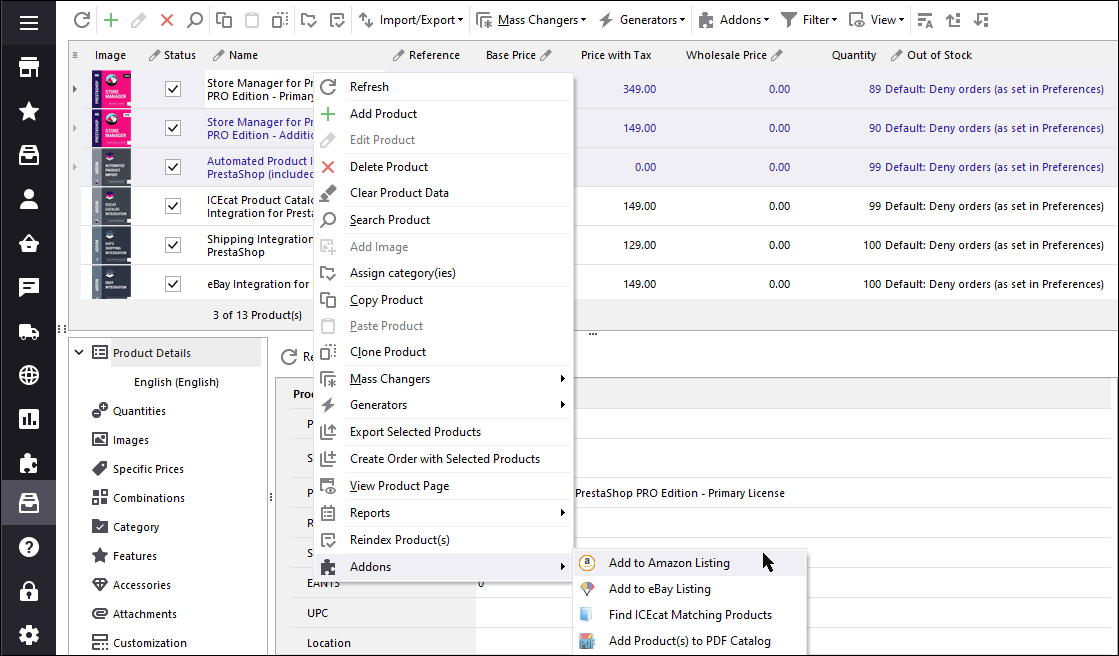
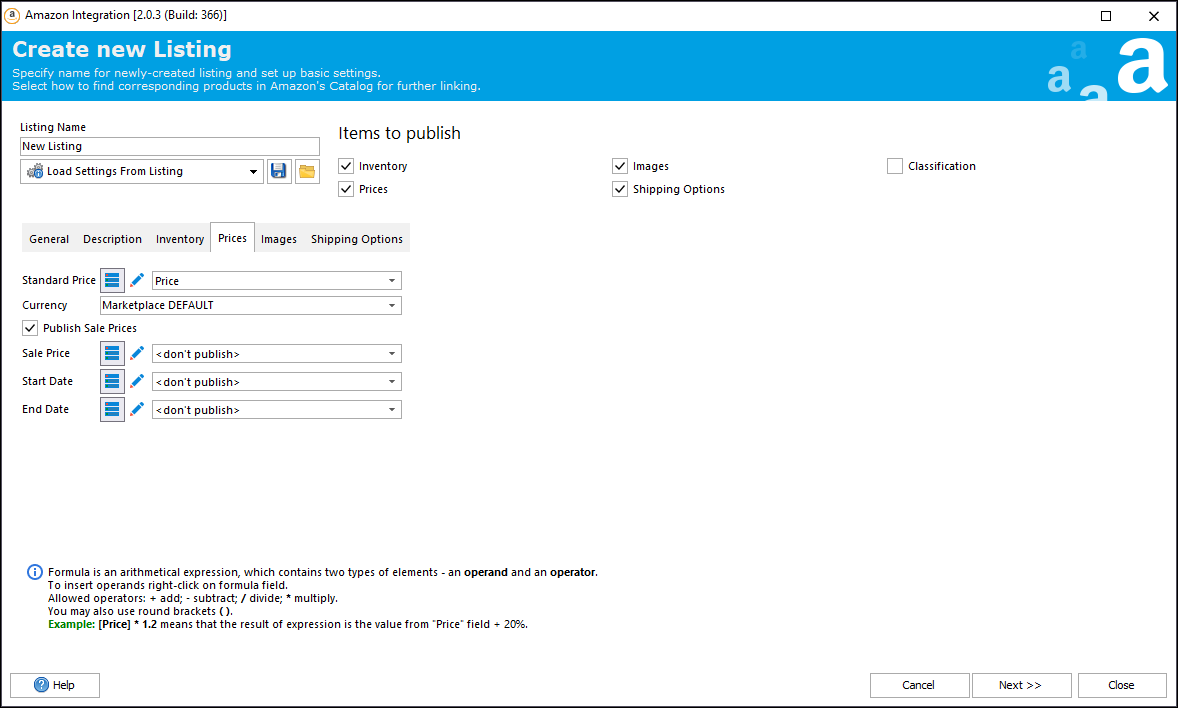
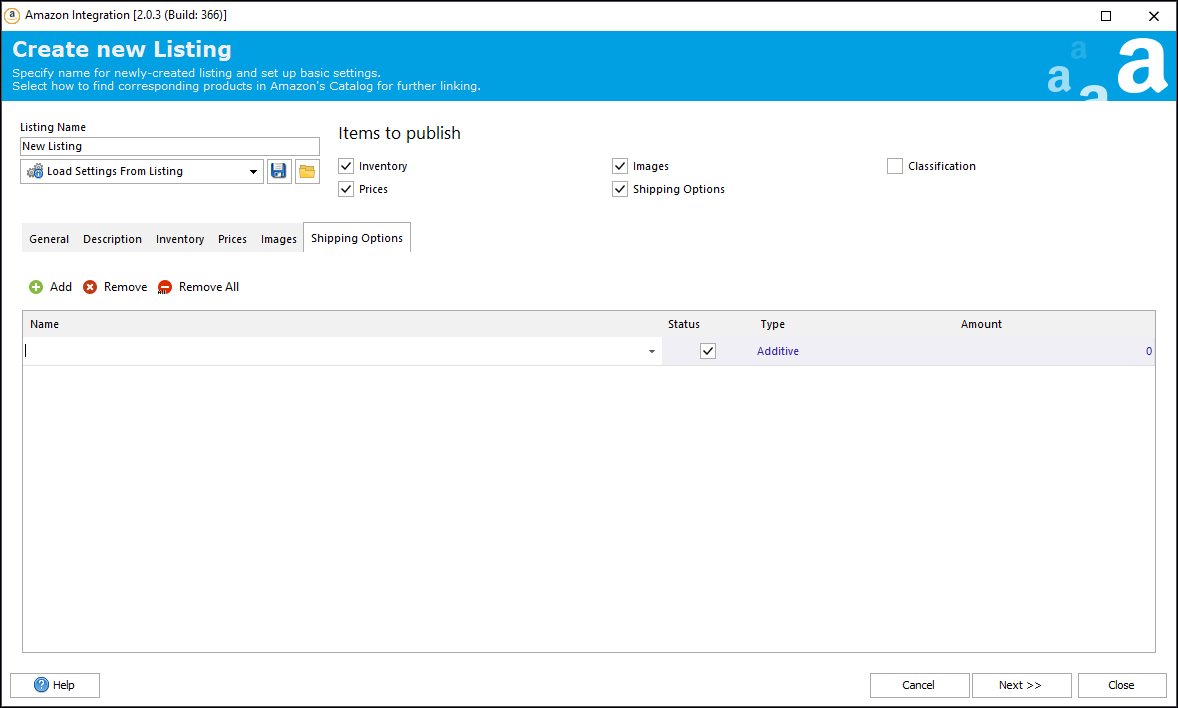
¿No tiene tiempo para exportar cientos de productos a Amazon? ¡ Entonces el Módulo de Integración Amazon para PrestaShop es un producto para usted! Esta herramienta completa le ayudará a vender productos fácilmente en Amazon a través de Store Manager para PrestaShop, instalado en su PC. Le proporciona la capacidad de exportar lista entera de productos así como las descripciones de los productos, la cantidad y los precios, de su tienda en línea a Amazon.
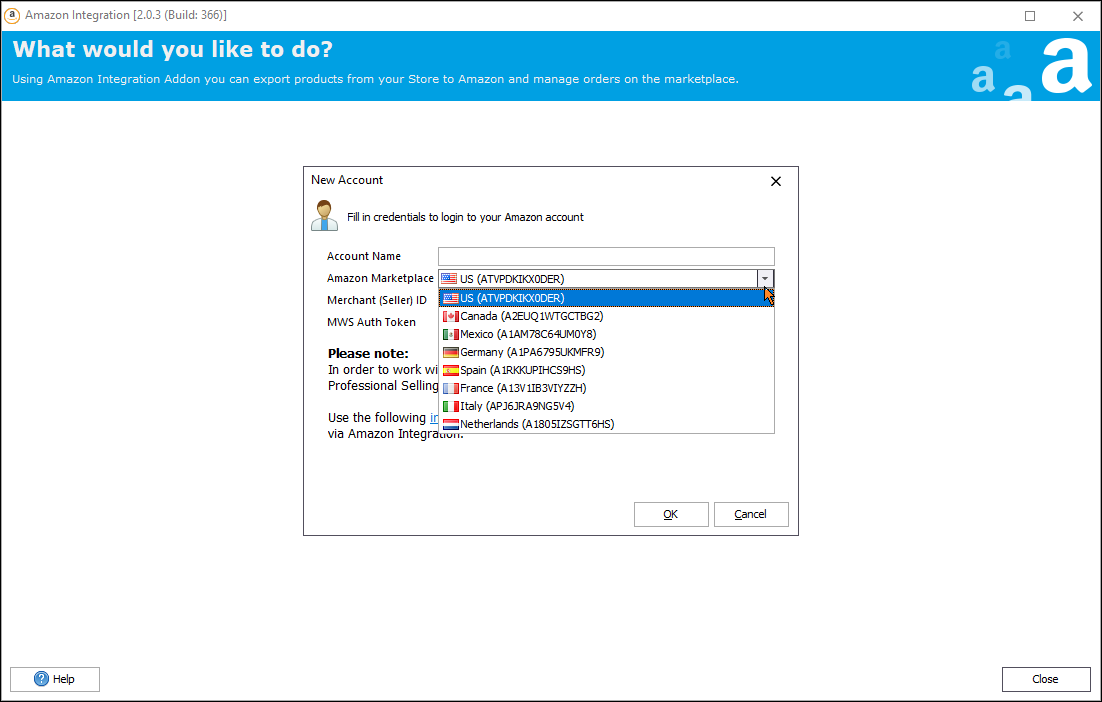
Sincronice los datos de PrestaShop con una región específica de Amazon
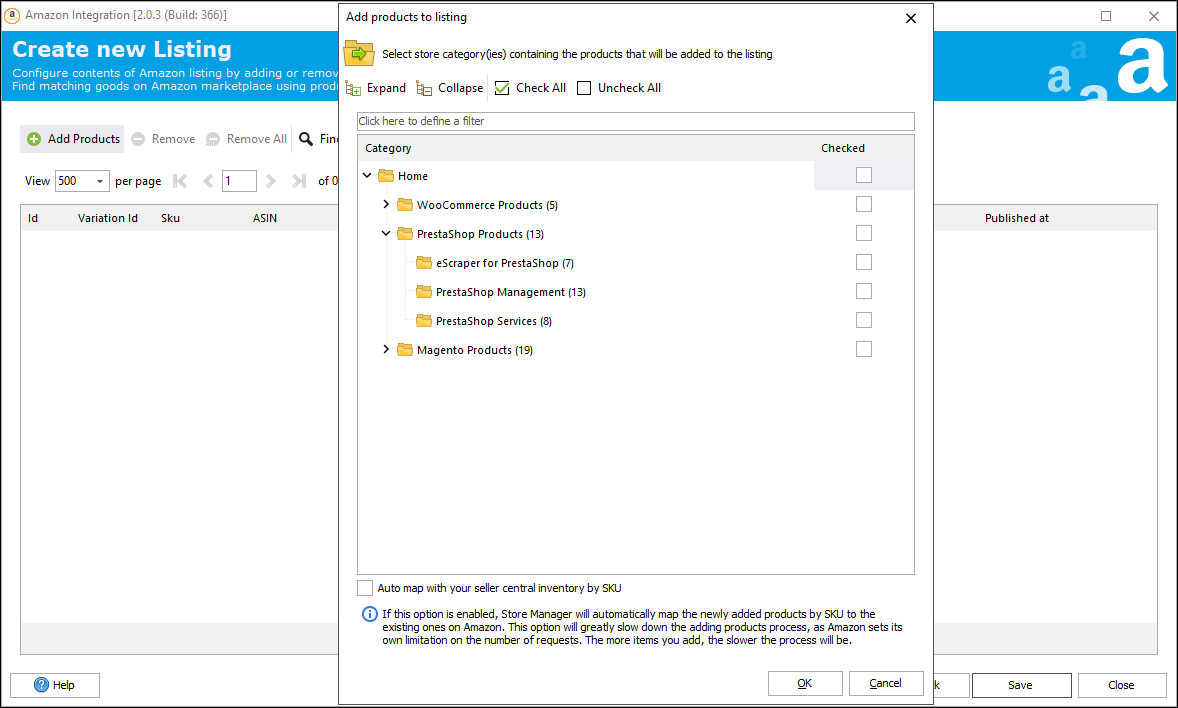
Exportar Productos de PrestaShop a Amazon
- Enlaza productos a Amazon automáticamente (si el identificador único o el nombre del producto coincide con la lista de Amazon).
- Enlaza productos manualmente en caso de que tengas artículos personalizados.
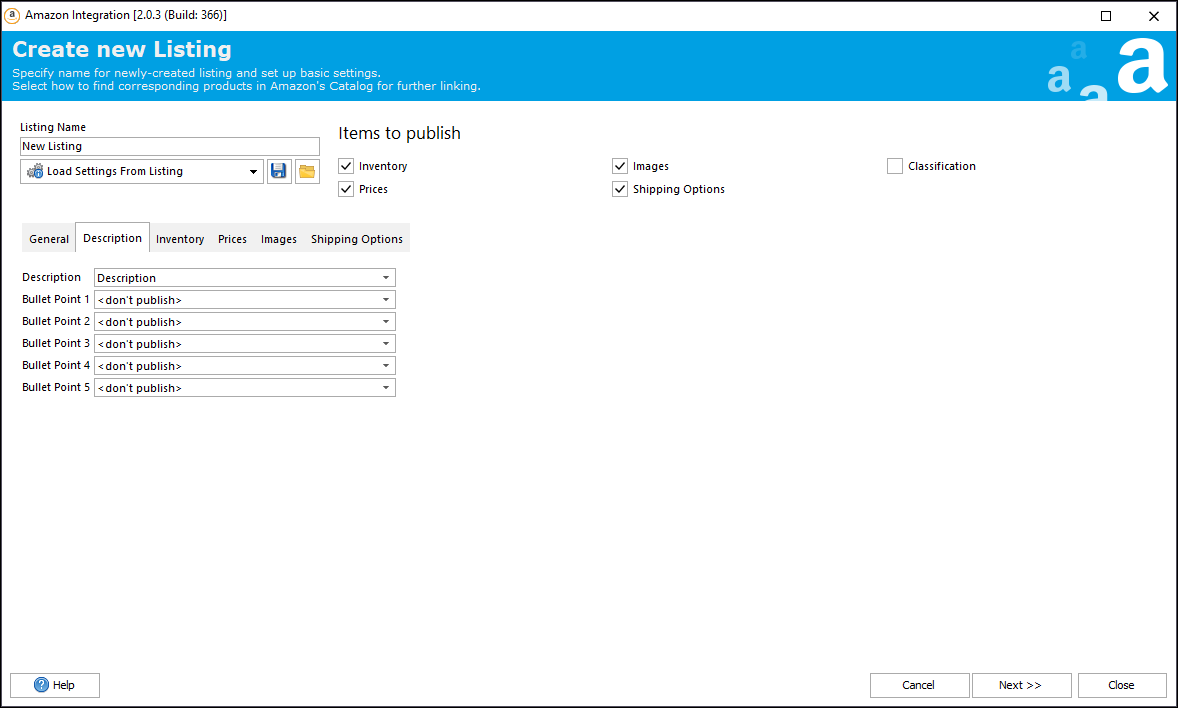
- Crea nuevos productos en Amazon para empezar a venderlos (incluso si no tienes identificador).
- Configura los campos del feed exportado a Amazon (título, descripción, peso, imágenes y otros).
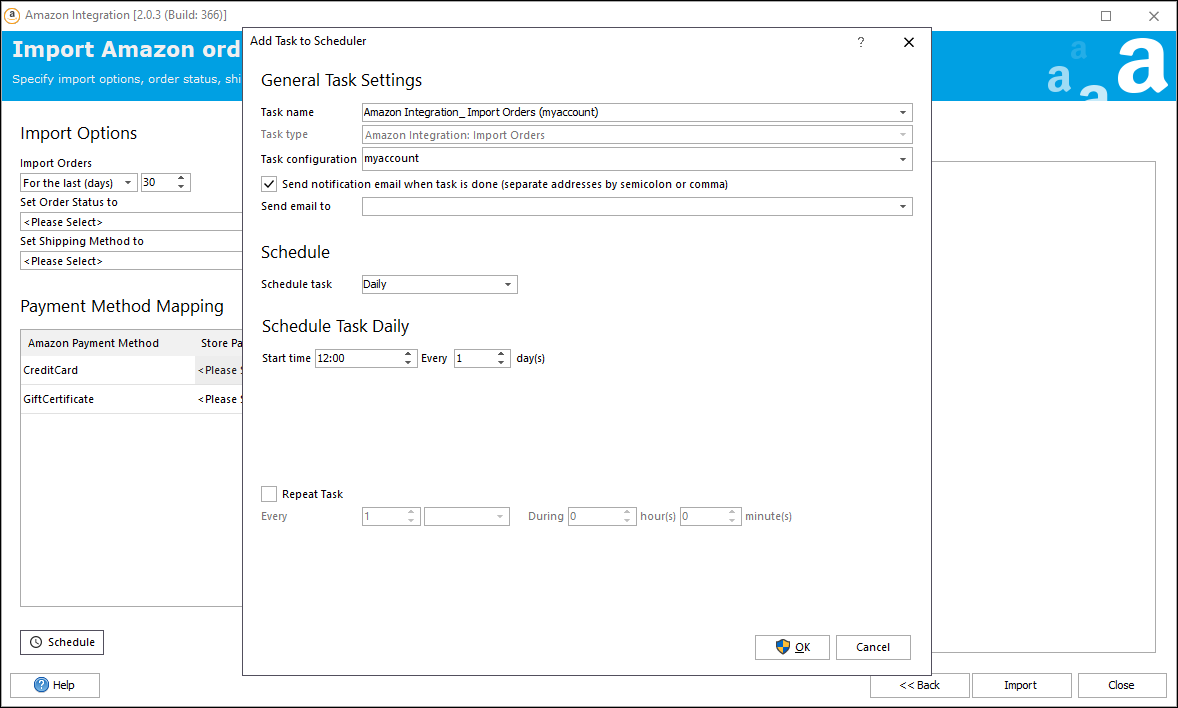
- Crea configuraciones programadas para la exportación de productos
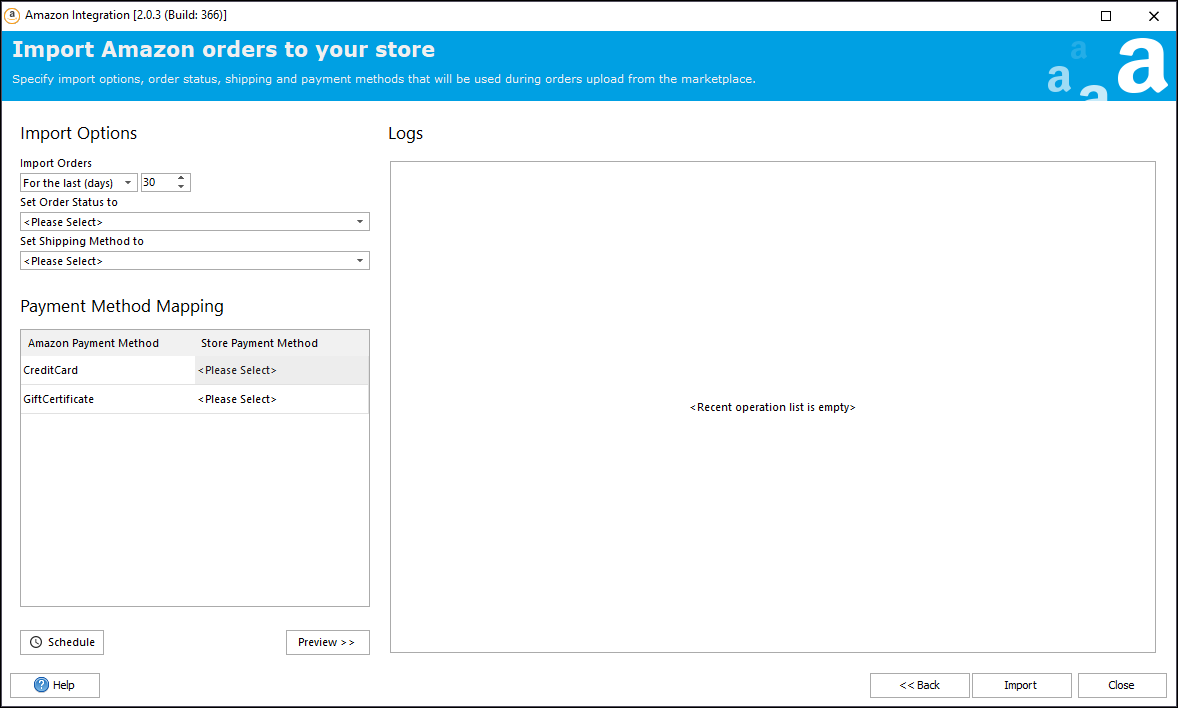
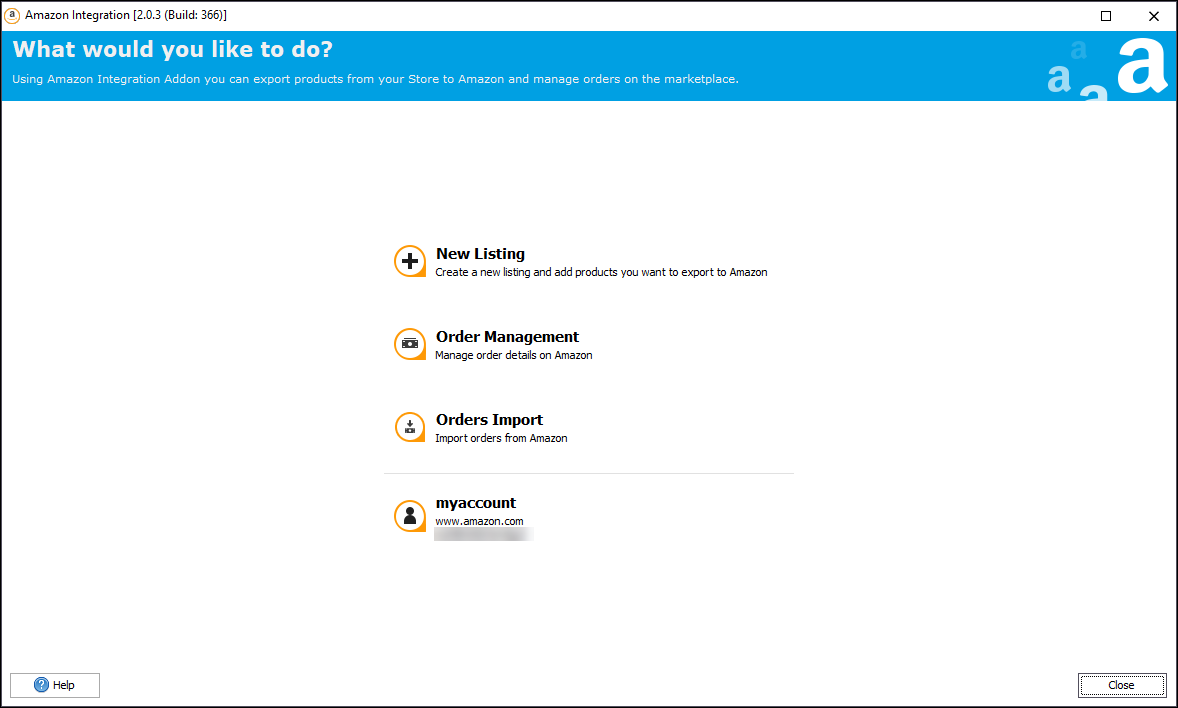
Gestionar pedidos en el complemento y sincronizar la cantidad de productos
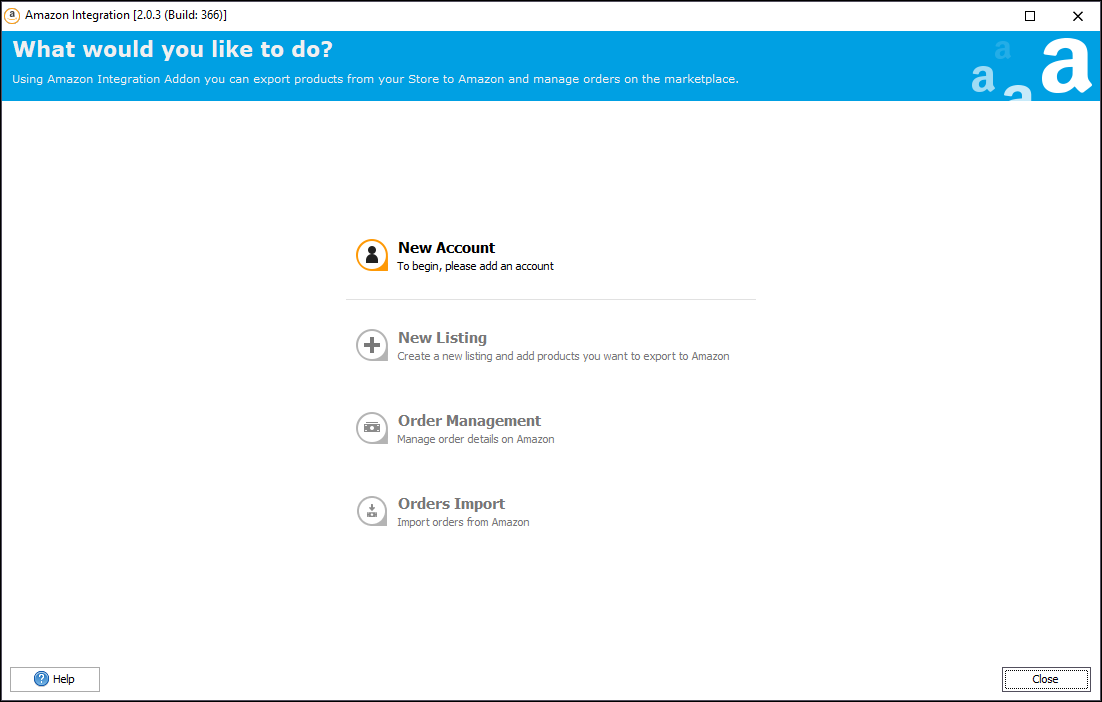
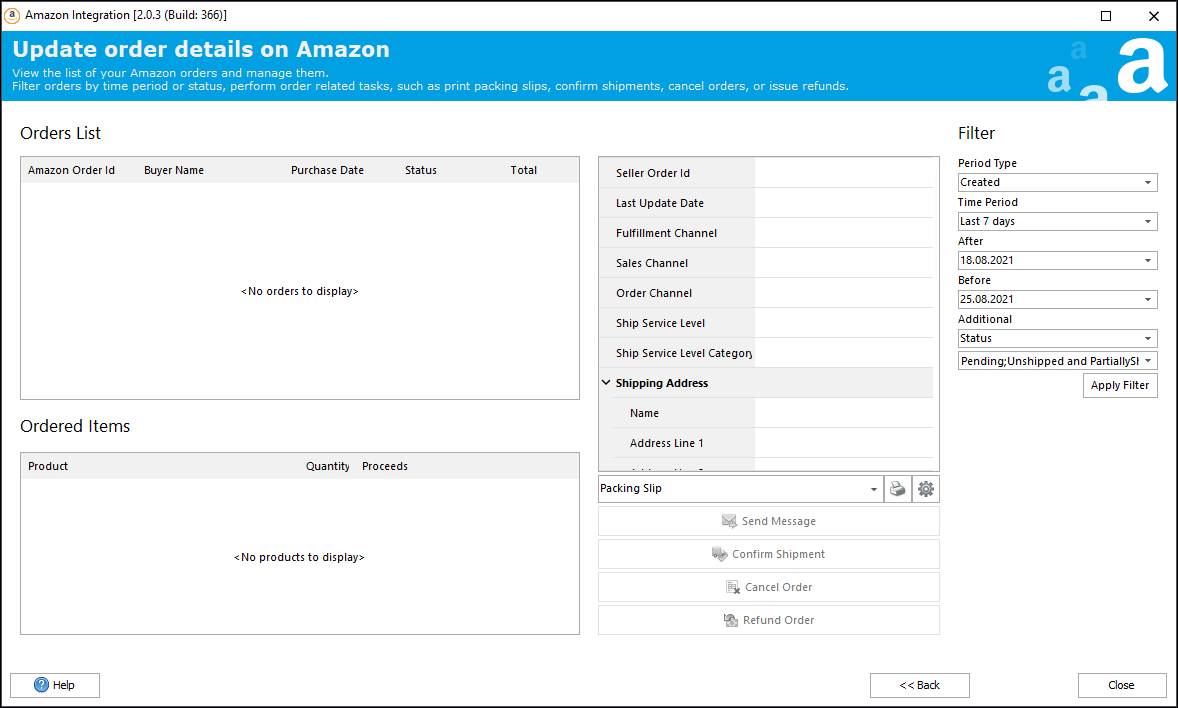
- Ve los pedidos realizados en el marketplace sin tener que iniciar sesión en Seller Central.
- Envía mensajes a un comprador directamente desde el addon.
- Mapea el estado de los pedidos, los métodos de envío y pago de los pedidos importados a los existentes en tu tienda.
- Imprime documentos, como albaranes, facturas, etc.
- Confirma el envío, cancela o reembolsa un pedido.
- Sincroniza la cantidad de productos desde Amazon a tu tienda PrestaShop (no incluye información personal del comprador).
- Configura actualizaciones automáticas programadas.
Revisar Resultados de Сontabilización
- puede controlar el proceso de contabilización en Amazon y ver los resultados de contabilización en el Módulo
- en cualquier momento que desee cambiar o corregir información de productos puede volver presionando el botón volver
El Módulo de Integración Amazon trae ventajas múltiples para su negocio, permitiéndole:
- Ahorrar el tiempo – El módulo le permite ajustar la configuración y realizar el derecho de exportación de Store Manager instalado en tu PC. Puede realizar la exportación en un período de tiempo breve.
- Reducir los errores – El módulo garantiza y asegura la exportación perfecta de los productos, reduce los errores de entrada de datos.
- Aumentar los ingresos – Puede ampliar sus ingresos corrientes vendiendo sus productos por todo el mundo.
- Encuentrar a los clientes nuevos – Muchos clientes nuevos vendrán a su tienda de los enlaces de Amazon.
El módulo de Integración Amazon es un gran instrumento ahorrador del tiempo para su negocio que le ayuda a ampliar corrientes de ingresos y encontrar a nuevos clientes vendiendo sus productos en el mercado gigantesco.
Requisitos técnicos para Integración Amazon para PrestaShop:
- Store Manager para PrestaShop
- Cuenta de Amazon
Opiniones de usuarios sobre Store Manager para PrestaShop
Pros: Free trial for up to 14 days Quick deployment Lots of features
Cons: I've only tried the free version so far. I have no reservations.
Reasons for Choosing Store Manager for PrestaShop: We needed a program that is simple and can be tried and tested first.”
I would recommend the tool if the day to day tasks with prestashop take a lot of your time.
What do you dislike? I haven't had any errors yet so I can't say anything bad.
What problems are you solving with the product? What benefits have you realized? - Problems with orders. Items with images with the same name. Incomplete carriers.”
Positive sides:
- works fast
- many functions
- convenience
- technical support that answers questions
Negative:
- periodically updated and you have to pay for updated versions
- there are bugs, but they are not critical”
”
”
”
We are currently working day and night on this new version of SM and, sincerely, there is nothing that can compete against your solution for Prestashop. It’s powerful, flexible, nicely designed and really reliable in terms of stability and communication with Prestashop 1.7. Not mentioning the unbeatable price of this solution!...
A 4.8 stars rating would be the minimum for such an amazing solution. So, what could make it even better? I would say, the possibility to add some key buttons like the famous "Post change to web" or any other key function, ideally located in the top ribbon of the main screen, below, "Mass changers", "Export", etc...and, an updated version of the user manual.
”
Estoy encantado con ellos, y he comprado el producto.”
I’ve been using the program for prestashop for around 4 years along with the eBay and amazon add on.
this program saves me a lot of time and effort with very powerful tools available with in the software
If you have a compatible shop this program is a must
Very easy to import new products with everything you would need to imported
What do you dislike?
Cannot really fault the program at all .
Recommendations to others considering the product:
Do it you won’t regret it it a great peice if software and will save you time and effort
What problems are you solving with the product? What benefits have you realized?
Day to day running , mass product import”
Thank you very much, really, you make my job much easier with Store Manager.”
So im checking and seeing all it's functions”
A must have if you have a PrestaShop store.”
I love the whole app. The quick adding of products.
What do you dislike?
At this time i have no dislikes, maybe i have don't discovered it yet.
What problems are you solving with the product? What benefits have you realized?
Adding products.”
Everything is easy:
-creating categories, products
-moving categories, products
-editing categories and products ( bulk
-easy order follow through
It's an amazing job, this guys bring it to the next level.
IT was a hassle to connect the store, and from time to time I have to repeat the process, something happens. I do want to specify that I don't use their service of connecting through the cloud.
Easy moving products from categories, easy applying filters and features ( bulk ), easy reordering product display inside the category. Great software”
”
I highly recommend the product and company!”
Programa de fácil utilização intuitiva e muito útil.
Pena o valor da aquisição.”
Et l'assistance par chat est vraiment très bien.
Félicitations à l'équipe de store Manager, je ne pourrais m'en passer, il ne faut pas hésiter à investir pour Store Manager, rien ne vaut Store Manager
Sylvie”
It saves a huge amount of time in synchronizing inventory between PrestaShop and eBay.”
We requested eMagicOne to create this for us based on specifications we had, they exceeded our expectations with the time and accuracy that they accomplished the task.”
We have been using QB Integration addon for more than a year now in our online store running on Prestashop. The application came along as a result of a lack of features in other apps I found on the market. Other apps in addition to being very expensive and with no choice but a monthly subscription, were not fulfilling our company needs. eMagicOne has created the perfect tool for our company allowing for a simple, automated workflow and synchronization between our store and our QuickBooks file.”
I've pestered tech support with questions, and always got the right answer to my question no matter who I spoke with.”
BTW their support is always able and willing to fix any issues that I have had. Fast turnaround on tickets, most time in the same day. I would highly recommend the product over all the others that I have tried.”
Il permet de diffuser en quelques clics votre catalogue produits en France et à l’international.
En multipliant nos canaux de diffusion nous avons optimisé l’ensemble de nos campagnes web. Les fonctionnalités proposées par emagicone nous ont permis d’améliorer nos performances sur chaque support.”
I tried many different extensions and this one is the best. It's not perfect, but I was not able to find anything better. ”
Gain de temps , rapide, écran clair, modification facile et surtout import export sous excel un vrai plaisir.
Le service après vente et hot-line efficace.
Ils sont à votre écoute et cela jusqu'à ce que le problème soit résolu.
Cela vaut le coup de tester leur version d'essai.”
You have left us the review concerning Store Manager's price. Store Manager is all-in-one that contains multiple features gathered in one program. The software allows you to speed up your inventory by 150%, automatically update your products, manage customers and orders in bulk, integrate with multiple suppliers and systems. It includes the features of multiple modules. This in an investment that will quickly pay off in the future.
In any case, we always try to meet our clients' expectations and we have got 2 editions of Store Manager - Standard and PRO for businesses of different sizes.
Moreover, we often run promotions and offer the clients some deals -
https://www.prestashopmanager.com/useful-articles/about-prestashop/store-manager-for-prestashop-discounts/”
Concerning your questions, please, contact us via live chat or e-mail contact@prestashopmanager.com and our support managers will gladly assist you.”
i am trying your software for my ecommerce.
the your software is very good.
i need create in automatic the invoice and delivery sLIP for my Italian carrier.
the italian carrier ask mandatory the volume and weight for each my shipping.
can I modify the your template (delivery template)?
can you help me ?
after this i can buy this software.”
The benefit using prestashop manager is incredible: you can speed up a lot any operation
and you can do bulk actions with only a click of your finger.
I reccomend it to anywhone who whants to make a serius shop: the cost is minimal and it will save you a lot of trouble and, of course, money.”
Thank you for bringing this situation to our attention. Each review is important for us, even the one, describing negative experience.
Store Manager for PrestaShop is a paid application and this information is clearly outlined at our official website. Free 30-day trial version has been developed on purpose to allow users to test fully-functional Store Manager, check its features and decide whether the application suits you. Before testing you can check Store Manager price at http://prestashopmanager.com/order. This information is accessible to everyone, here is feature comparison and price specified.
Concerning fraudulent activity, we should assure you, Store Manager for PrestaShop as well as other eMagicOne products are 100% save, since they has been tested and checked for viruses from our side. This activity does not happen to users who download Store Manager from official website - https://www.prestashopmanager.com. We are on the market more than 10 years, so we value our reputation and our clients highly.”
1. das Programm lässt sich nicht installieren Fehlermeldung
2. entgegen der Behauptung es sei kostenfrei, ist nun nur eine 30 Tage Trial Version verfügbar, danach, kostet es dann wohl doch Geld. Das ist trügerisch.
3. Phishing Meldung des Email Clients, das ist nicht vertrauenswürdig
Thunderbird hält diese Nachricht für verdächtig!
Es könnte sein, dass die Nachricht zu einer betrügerischen Webseite führt, die eine andere Webseite optisch imitiert. Eventuell möchte man Ihnen sensible Daten stehlen (z.B. PIN, TAN, Benutzernamen, Passwörter, etc.).
Wollen Sie wirklich die folgende Webseite besuchen?
links.prestashop.mkt7862.com
Aus diesem Grunde habe ich das Modul wieder deaktiviert und werde es nicht benutzen.
Gerd Schrode”
(Trial period)
quando ho provato questo tool per la prima volta non mi aspettavo un potente software gestionale, rifinito nell'interfaccia, popup multilingua con editor di tags e quant'altro è possibile immaginare.
Si clicca su import/Export product e viene fuori una miriade di customizzazioni nell'import da paura; passo passo la guida esplicativa ti da la possibilità di scegliere come importare i prodotti/categorie, da HDD fisso, da HTTP se è su un server esterno o via FTP se è già sul vostro server; il file che importate (csv/xls) può essere adattato al software, se le colonne non sono nello stesso ordine il software da la possibilità di rileggerle e catalogarle a vostro piacere e salvare la configurazione, così da non farlo ogni volta; per le immagini si ha la possibilità di creare una directory sul vostro pc così da caricare più velocemente le immagini; do un consiglio ai meno esperti: evitate di connettervi al database direttamente ma usate il bridge, altrimenti se farete degli errori sul software automaticamente verranno registrati sul server.
Fate un backup del database prima di apportare delle modifiche, se volete anche qui il software vi aiuta con backup automatici, usateli perchè sono davvero utili in caso di errori dovuti all'incuria umana.
Nel periodo di prova ho avuto varie occasioni di poter contattare il Servizio Clienti di Store Manager:
avere il piacere di essere aiutati da persone squisite e da professionisti non è da tutti, risolvono i problemi e chiariscono i dubbi in men che non si dica. Qualità e Professionalità indiscutibili.
Grazie”
Save too much time”
I have 150+ new products that have come in this morning. In the old-fashioned way, that would take over 20 hours of work introducing them in my webshop. Now, I think I will manage in 5. Max. Can't wait. ”
This has literally saved my online store. It was becoming almost impossible (and very frustrating) with updating items on my store, I have thousands, it was literally taking a week to update them all. However, everything has changed dramatically using this software, I can complete the task in under an hour!
Everything is right in front of you, bulk updates, easy to navigate import options, SO MANY features! I was so excited once I realised how much this software can do for me. It's like having a group of assistants doing the work that would have taken weeks for me to complete! (Especially the customization tool!) I can set a task running and go off and do other more pressing tasks.
Thank you so much this has changed my way of working and completely reduced stress levels.
Thank you, Thank you, Thank you for this amazing software! Simply Brilliant.”
Qui si dimostrano i limiti del software web rispetto agli "antichi" programmi Client/Server transazionali.
StoreManager infatti è molto più veloce perchè può mettere in coda più modifiche al database MySQL, committandole tutte in un solo colpo.
Inoltre l'interfaccia è molto più usabilee completa : in questo modo per fare una modifica non dobbiamo perdere ore tra a saltare da una schermata all'altra, come con la dashboard PHP di PrestaShop.
Un vero 'must have'.”
Sono davvero molto soddisfatto di aver trovato un prodotto così perchè mi permette di gestire al meglio i prodotti, le categorie, gli ordini, i clienti, le newsletter e soprattutto permette di effettuare modifiche massive di cui il normale Prestashop è molto limitato; la cosa davvero impagabile è che tutte le modifiche avvengono davvero in un Click !!!...
Inoltre permette di lavorare sul sito direttamente dal BackOffice (qualità assolutamente eccezionale!!) A livello gestionale, dunque, è davvero perfetto e quindi a mio avviso è il miglior prodotto che attualmente il mercato offre; lo consiglio certamente a chi mi chiederà informazioni e ritengo che sia l'acquisto più utile per la gestione del mio sito.
Consigliato al 100%”
The support of the team is also perfect, they answer immediatly on their livechat and you can ask any question you want, they will solve it there and then for free, worst case scenario they tell you to send your configuration store file and they solve the probleme in the next 2 days and inform you by mail so a really devoted team, they take care of their old customers.
I would buy again whithout a doubt, it is a quality company with great support”
Da Prestashop manager è possibile modificare sia gli articoli sia i contenuti del proprio sito Prestashop, permettendo di risparmiare una grande quantità di tempo. Consigliato!”
Zudem war es das Ziel eine geordnete Übersicht über alle Produkte zu erhalten.
Problem des Backoffice des Prestashop ist, dass der Server abstürzt, wenn zuviele Produktkombinationen erstellt werden.
All diese Dinge löst der Store Manager von eMagic One. Wir kaufen jetzt nach der 30 tägigen Testphase die Professionell Version um auch in Zukunft schnell und effizient arbeiten zu können.”
Da Prestashop manager è possibile modificare sia gli articoli sia i contenuti del proprio sito Prestashop, permettendo di risparmiare una grande quantità di tempo. Consigliato!”
Zudem war es das Ziel eine geordnete Übersicht über alle Produkte zu erhalten.
Problem des Backoffice des Prestashop ist, dass der Server abstürzt, wenn zuviele Produktkombinationen erstellt werden.”
Il programma è progettato molto bene, la schermata è chiara ed è facilissimo comprendere come realizzare le varie attività senza seguire alcun manuale o corso. Grazie alle sue funzionalità è stato possibile inserire oltre 1000 prodotti in meno di una settimana, tutti manualmente, con descrizioni accurate, fotografie e manuali.
Il tutto senza usare lo strumento di importazione automatizzata che consente in pochi istanti di caricare migliaia di prodotti: questo strumento è infatti uno dei tanti strumenti compresi nel programma, utilissimo per importare set di prodotti di notevoli dimensioni memorizzati in archivi tipo fogli escel o CSV.
Il programma permette di gestire ogni dettaglio del Back Office di Prestashop: Prodotti, Categorie, Attributi, Produttori, Caratteristiche, Spedizioni ed ogni altro dettaglio.
Consente inoltre la modifica di gruppo degli articoli permettendo cioè di modificare in un colpo solo una descrizione, un prezzo, una quantità o altri parametri per un numero elevato di prodotti contemporaneamente.
Infine esso fornisce importantissimi strumenti come il backup ed il ripristino del database e l'accesso alle sue tabelle grazie al quale si possono effettuare modifiche che da BO è impossibile fare.
Direi che per chi deve gestire un sito professionale questo è non solo uno strumento indispensabile ma molto probabilmente il migliore.”
Il programma è progettato molto bene, la schermata è chiara ed è facilissimo comprendere come realizzare le varie attività senza seguire alcun manuale o corso. Grazie alle sue funzionalità è stato possibile inserire oltre 1000 prodotti in meno di una settimana, tutti manualmente, con descrizioni accurate, fotografie e manuali.
Il tutto senza usare lo strumento di importazione automatizzata che consente in pochi istanti di caricare migliaia di prodotti: questo strumento è infatti uno dei tanti strumenti compresi nel programma, utilissimo per importare set di prodotti di notevoli dimensioni memorizzati in archivi tipo fogli escel o CSV.
Il programma permette di gestire ogni dettaglio del Back Office di Prestashop: Prodotti, Categorie, Attributi, Produttori, Caratteristiche, Spedizioni ed ogni altro dettaglio.
Consente inoltre la modifica di gruppo degli articoli permettendo cioè di modificare in un colpo solo una descrizione, un prezzo, una quantità o altri parametri per un numero elevato di prodotti contemporaneamente.
Infine esso fornisce importantissimi strumenti come il backup ed il ripristino del database e l'accesso alle sue tabelle grazie al quale si possono effettuare modifiche che da BO è impossibile fare.
Direi che per chi deve gestire un sito professionale questo è non solo uno strumento indispensabile ma molto probabilmente il migliore”
Esso fornisce in realtà diverse funzioni:
1. Vendita sul proprio sito e-commerce dei prodotti presenti sul proprio account eBay
2. Vendita sul proprio account ebay dei prodotti in vendita sul proprio sito online
3. Sincronizzazione di prezzi, quantità ed altri parametri tra i prodotti del sito e quelli su ebay
La potenza dello strumento è notevole in quanto consente di sincronizzare le categorie del proprio sito online con quelle di ebay, sia automaticamente che manualmente: ovviamente si può decidere di vendere i prodotti di tutte le categorie o solo quelli di alcune.
Una volta selezionate le categorie di interesse, per ognuna di esse consente di impostare i parametri comuni dei prodotti quali marca , sistema operativo e così via.
Permette quindi di definire tutti i tipi di pagamento possibile, PayPal incluso ed impostare anche particolari condizioni tramite un messaggio da visualizzare.
La vera potenza di questo strumento è che permette di personalizzare ogni aspetto delle inserzioni, decidendo se si tratta di aste online o Compralo Subito, se si accetta una proposta di acquisto e così via.
Il prezzo di ogni singolo prodotto può essere inoltre modificato rispetto a quello del prodotto nel sito tramite una formula (ad esempio moltiplicandolo per una percentuale), e questo è utile per recuperare le commissioni che ci sono in eBay.
Infine questo stupendo modulo consente di impostare le informazioni sulle spedizioni nazionali ed internazionali, definendo i prezzi dei vari corrieri.
Il pregio è che sia il titolo che la descrizione dell'inserzione possono essere creati in base alle proprie esigenze, unendo ad esempio la descrizione del prodotto ad altre informazioni utili da mettere prima o dopo, come un logo, un numero di telefono o l'indirizzo del sito online.
Insomma un modulo indispensabile per che intende vendere professionalmente su eBay e far conoscere tramite eBay il proprio sito online”
Questo modulo mi consente di programmare l'importazione del mio listino sull'area FTP.
Per impostare la procedura di importazione basta salvare il file di configurazione con le impostazioni necessarie per eseguire la procedura, e nei successivi processi di importazione il programma manterrà quanto da voi scelto.
Settare correttamente i parametri FTP per il collegamento tra Store Manager e la vostra cartella in remoto è molto semplice, grazie al supporto grafico dedicato che vi consente di sfogliare le varie cartelle presenti sul vostro server.
Una volta settata la procedura sarà possibile modificare i Task programmati e modificare gli orari di esecuzioni degli stessi.
I task vengono eseguiti anche se il programma è minimizzato ad icona.
E' possibile verificare l'esatta esecuzione dello script grazie al report presente nel plugin il quale riporta data e ora dell'ultima esecuzione e lo stato della stessa.
Ho contattato molte volte l'assistenza e sono sempre stati cortesi e celeri nel risolvere i miei problemi
Per la mia personale esperienza, consiglio l'acquisto del modulo.”
It saves us lots of time and makes it possible for us to make unique catalogues for our costumers.
Highly recommended!
Michael E. Olsen
DTM TAG”